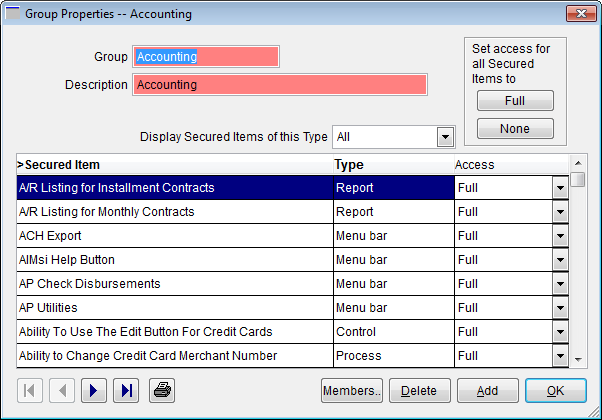
Group Properties window
Purpose
Use this window to assign secured item access to a group.
To assign access to secured items to more than one group at a time, use the Group Permissions to Secured Items window.
To access this window
On the Employee/Group Administration window, click Properties.
Diagram
The following thumbnail illustrates the Group Properties window. Click it to view a full-size image.
Item descriptions
 Fields and boxes
| Item | Description |
|---|---|
| Group | Enter or edit the group name, up to 20 characters. |
| Description | Enter a brief description of this group, up to 60 characters. |
| Display Secured Items of this Type |
Select an option to display only secured items of that type (Control, Menu Bar, Process, or Report) in the grid. |
|
grid columns A right angle bracket (>) identifies the column currently used to sort the grid. This grid may be sorted by Secured Item or Type. |
|
|
Secured Item |
Lists each available secured item. |
|
Type |
Lists the type of each secured item (Control, Menu Bar, Process, or Report). |
|
Access |
Lists the access level assigned to each secured item for this group. Click the drop-down arrow to select a different access level. |
Buttons
| Item | Description |
|---|---|
| Full | Assigns Full access to all secured items for this group (members will have access to all secured items). |
| None | Assigns None access to all secured items for this group (members will not have access to any secured item). |

|
Click to view the first employee record (alphabetically by last name, a-z). |

|
Click to view the previous employee record (alphabetically by last name, a-z). |

|
Click to view the next employee record (alphabetically by last name, a-z). |

|
Click to view the last employee record (alphabetically by last name, a-z). |

|
Opens the Select a Report window where you can generate the User Listing report, Users and Groups to Which They Are Members report, or Groups and Their Members report. |
| Members | Opens the Group Members window where you can add and remove employees from the group. |
| Delete | Deletes the group from AIMsi. |
| Add | Clears the window so you can create a new group. |
| OK | Accepts any changes and closes the window. |